Panel Alarm
About
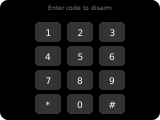
The alarm panel provides a numeric keypad (0-9, CLR, DEL) for entering an alarm code, and up to 4 action buttons for arming/disarming the security system. It is intended for use with alarm_control_panel entities.
Tapping an alarm_control_panel item on another panel (e.g. a grid tile) opens the popup variant (popup_alarm) for that entity.
Display
- Title — Shows the current alarm state label (e.g., "Disarmed", "Armed Home", "Triggered"). While entering a code on the keypad, the title shows password dots instead.
- Header indicator — A shield icon in the top-right header reflects the armed state: red (armed), green (disarmed), amber (arming/pending).
- Keypad — 12 buttons: digits 0-9, CLR (clear all), DEL (delete last digit).
- Action buttons — 4 bottom buttons whose content depends on the alarm state:
- Any other state (armed, arming, pending, triggered, disarming) — A single "Disarm" button.
- Disarmed (also
unknown,unavailableor no state) — Up to 4 arm mode buttons, filtered by the entity's supported features. Modes (in priority order): Home, Away, Night, Vacation, Bypass. If the entity reports no supported features, Home, Away and Night are offered.
Code Handling
- If the alarm entity has a
code_formatattribute, the code is always required to disarm. Arm actions require it too, unless the entity reportscode_arm_required: false. - If a code is required but none has been entered, the action is silently ignored (the keypad entry is preserved).
- The entered code is passed as the
codeparameter to the alarm service call. - After a successful action (or on alarm state change), the entered code is cleared.
How to configure
In the panel editor, set:
- Item (entity picker) — An
alarm_control_panelentity to control. Required. - Keypad section — visual styling for the numeric keypad:
- Keypad font size — Font ID for the keypad digits (0-7, larger = bigger text). Default:
2. - Keypad button background — Background color of each key. Default: the theme's page background (
4226), so the keys sit flat on the page. - Keypad text color — Color of the keypad digits. Default: the theme's component text (
65535).