Panel Timer
About
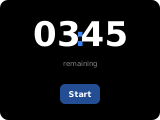
The timer panel provides a local countdown timer with start, pause, and stop controls. The timer runs in the Hub — it does not use a Home Assistant timer entity, and it keeps running while the panel is closed. If a duration greater than 0 is set, the timer counts down from that value; if 0 is set, it counts up (stopwatch mode).
Popup Variant
The popup variant (popup_timer) mirrors the main panel layout. Since the timer has no entity, open it from an item by setting the item's popup_key to popup_timer (or with a navigate:popup_timer item).
Controls
| Widget | Description |
|---|---|
| Time display | Shows MM:SS format. Large digits in the center of the panel. |
| Up/Down buttons | 4 sets of up/down arrows for setting digits (M1 M2 : S1 S2) before starting. |
| Start button | Starts the timer (with 00:00 it starts the stopwatch). While running it becomes a pause button, and a resume button when paused. |
| Stop button | Stops the running timer. When stopped with a non-zero value it resets to 00:00. Disabled at 00:00. |
| Header stop button | Right secondary header button; visible only while the timer is active. Stops the timer. |
How to configure
In the panel editor, set:
- Show Notification (toggle) — When the timer finishes (reaches 00:00 in countdown mode), the alert sound is played if the device's
sound_on_notificationoption is enabled. If this option is enabled, a notification popup is also shown on the display. Default: Off.
Display Behavior
- Before starting: The up/down arrow buttons allow setting the initial duration.
- Running: The time display updates every 0.5 seconds. Start button becomes a pause/resume button.
- Finished (countdown): The alert sound plays (if
sound_on_notificationis enabled); if Show Notification is enabled, a popup notification appears. - Stopwatch mode: When initial duration is 00:00, the timer counts up from 0.
- The timer state is kept in the Hub's memory — it survives display restarts but is lost when Home Assistant or the integration restarts.