Panel Vacuum
About
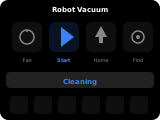
The vacuum panel controls a vacuum/mop robot entity with start/stop, return-to-base, fan speed selection, and locate commands. Up to 6 secondary entities can be displayed as quick-action buttons below the main controls.
Popup Variant
The popup variant (popup_vacuum) mirrors the main panel layout. It is used automatically when a vacuum entity is assigned as an item on another panel.
Controls
| Widget | Description |
|---|---|
| Action button | Start or resume cleaning (docked/idle/paused), or while cleaning/returning pause (if supported) or otherwise stop. Icon changes dynamically. |
| Home button | Return to charging dock. Visible when the entity supports return home. Disabled when already docked. |
| Fan button | Opens a fan speed selection popup. Visible when the entity supports fan speed. |
| Locate button | Triggers the locate/sound alarm on the vacuum. Visible when the entity supports locate. |
| Status text | Shows the current state label (e.g., "Cleaning", "Docked", "Returning", "Idle") |
| Battery indicator | Header icon shows battery level. Visible when a battery sensor is configured. |
| Secondary items | Up to 6 additional entity buttons below the main controls. |
How to configure
In the panel editor, set:
- Item (entity picker) — A vacuum entity to control. Required.
- Battery Sensor (entity picker) — Optional sensor entity reporting the battery level. Home Assistant deprecated the
battery_levelandbattery_iconattributes on vacuum entities, so this sensor replaces them. - Secondary Items (item list) — Up to 6 additional entities to display as quick-action tiles below the vacuum controls. Useful for sensors (e.g., filter status, mop state) or toggles.
Display Behavior
- The title defaults to the entity's friendly name.
- Buttons are shown or hidden based on the entity's supported features.
- Start/pause/stop icon changes dynamically based on the vacuum state.
- The battery icon is shown in the header when a battery sensor is configured. The icon follows the sensor's
iconattribute when set, otherwise its level in 10 % steps. Without a battery sensor no battery icon is shown.