Panel Row
About
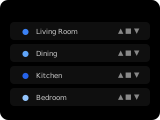
The row panel shows up to 5 entities as stacked rows, each with an icon and name plus a control suited to the entity type. If more than 5 entities are configured, a next-page button appears for scrolling. This panel is ideal for placing simple toggles, sensors, and quick actions in a single view.
How to configure
In the panel editor, add the entities you want to display as items. Each item uses the standard entity picker.
Display Behavior
- If more than 5 entities are configured, a next-page button appears.
- Control by entity type: covers get open/stop/close buttons;
number/input_numbera slider;switch,input_boolean,automationandlighta toggle;button,input_button,scene,script,lockandvacuuma button; everything else (includingtimer) a text value. numberandinput_numberentities are shown as a slider; releasing it sets the entity's value. While the entity is unavailable, its state is shown next to the slider instead of a value.- Covers show open, stop and close buttons; the stop button is only active while the cover is moving.
- The panel remembers which page you last viewed and returns to it on revisit — this is automatic, not configurable.