Panel Media
About
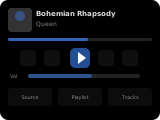
The media panel controls a media player entity — TV, speaker, or receiver. It displays the currently playing song/album art, and provides play/pause, volume, track navigation, and grouping controls. The album art, title, and artist info span the full panel width for a cleaner look. A vertical volume slider is on the right; a playback progress bar is shown while a track with a known duration is playing.
Popup Variant
The popup variant (popup_media_player) mirrors the main panel layout. It is used automatically when a media player entity is assigned as an item on another panel.
How to configure
In the panel editor, set:
- Item (entity picker) — A media player entity to control. Required.
Media Favorites
You can add media favorites as quick-select items. The editor shows one editable row per favorite:
- Sonos favorites (sensor entity picker) — A sensor holding the Sonos favorites in its
itemsattribute. This requires the Sonos integration to be configured in Home Assistant. By default the favorites appear under the Media button; enable Sonos favorites in source list to show them in the source selection popup instead. - Media Favorites — Add individual media items. Each entry is a single string: a media content ID (played as type
music, shown by its last path segment), or amedia_playerentity ID whose currentmedia_content_idand friendly name are used.
The Source button is shown when the player supports source selection and has a source list (or Sonos favorites are in the source list). The Media button is shown when media favorites are configured or a Sonos favorites sensor is set and not in the source list.
Grouping / Ungrouping
If the media player supports grouping (e.g., Sonos speakers), you can group and ungroup devices. Available group members are determined automatically from the entity's group_members attribute, plus any players listed in Group media player entities. The Group button is shown when the player supports grouping and at least one such player is available.
Display Behavior
- Album art, title, and artist span the full panel width.
- Shuffle, repeat, previous and next buttons are shown and usable whenever the media player reports support for them.
- The vertical volume slider is on the right side. Dragging it doesn't trigger swipe navigation; the new volume is applied when you release it.
- When nothing is playing, title and artist are blank. The header shows the channel name if the player reports one, otherwise the player's name.