Panel ClockTwo
About
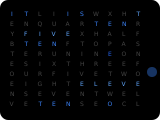
The clocktwo panel is a word clock: a grid of letters in which the words spelling the time (rounded to 5 minutes, e.g. "IT IS HALF PAST TWELVE") are highlighted, with four dots for the extra minutes. It supports multiple languages and customizable colors.
How to configure
In the panel editor, set:
Background
The clocktwo panel can have different background images. Select from the dropdown in the editor:
- Dark, Modern, Spring, Summer, Autumn, Winter, Dog 1, Dog 2, Cat
For dynamic backgrounds, choose Template… in the Background field and enter a Home Assistant template, for example {{ 'dark' if is_state('sun.sun', 'below_horizon') else 'modern' }}. The result must be a background name; the template is evaluated when the panel opens.
Language
Set the display language from the dropdown. Supported languages:
- English (default), German, Polish
Custom Colors
Customize the text colors in the panel editor:
- Off Color — Color for inactive/dim text segments (Default:
8452) - Letter Color — Color for active letter text (Default:
65535) - Special Color — Color for special text elements, i.e. the minute dots (Default:
62694)
Colors accept RGB565, [r,g,b] or #rrggbb.
Show AM/PM
Toggle to enable AM/PM display (Default: Off). Only works with the English language.
Show Intro Text
- Show Intro Text — Show intro text always (Default: On)
- Show Intro Text Full Hour — Show intro text on full hours (Default: Off)
Show Notifications
Toggle the notifications icon on/off.