Panel Weather
About
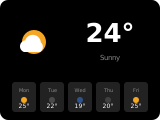
The weather panel can be used as a screensaver. It displays weather details, time/date, and optional background images. Up to two info items can be placed below the weather display.
How to configure
In the panel editor, set:
Item (entity picker) — A weather entity to display. Required.
Info Items
Additional sensor entities can be shown as info panels below the main weather data. You can add up to 2 info items. Common uses: indoor temperature, humidity, CO2 level.
Background
The weather panel can have different background images. Select from the dropdown in the editor:
- Dark — a clean dark theme
- Modern — modern gradient
- Spring — floral theme
- Summer — warm theme
- Autumn — fall colors
- Winter — cold theme
- Dog 1, Dog 2, Cat — pet-themed backgrounds
For dynamic backgrounds, choose Template… in the Background field and enter a Home Assistant template, for example {{ 'dark' if is_state('sun.sun', 'below_horizon') else 'modern' }}. The result must be a background name listed above; the template is evaluated when the panel opens.
Show Forecast
Toggle Daily or Hourly forecast display in the editor. If the weather entity returns fewer than 5 forecast entries, the remaining forecast slots stay empty.
Show Weather
Toggle the main weather icon on/off.
Show Temperature
Toggle the main temperature text. When Show Home Temperature is also enabled, the NSPanel's internal temperature is shown alongside the weather.
Weather Icon Color
Choose Color (default) to color the main and forecast icons by condition, or Monochrome to use the text color.
Show Notifications
When enabled, the main weather icon blinks as a notification bell while there are new notifications. When all notifications have been read but some are still queued, the bell stays visible statically so the queue is not overlooked. Tapping the icon opens the queued notifications.